6 VS Code essential extensions
Whenever you are just starting out with programming, you have switched to VS Code or even if you already have experience with VS Code, we all may want to discover or rediscover tools that will make us more productive and confident when writing code.
ESLint and Prettier
This is a very basic pair that will help us write code in a more consistent way. Prettier settles formatting — quotes, spacing, line width — so nobody argues about it in review. ESLint catches the things that are not style at all: an unused variable, a missing dependency in a hook, a promise nobody awaited.
The extensions only surface what your project already decides. They read the configuration from the repository, so before installing anything, add both to the project itself and make sure every contributor gets the same rules.
npm install --dev prettier eslint
And with a set of existing eslint and prettier rules, there a lot of standards out there, but you can use these I already made team proof.
npm install --dev eslint-config-cretia prettier-config-cretia
And just modify your package.json to include the next lines
{
  ...,
  "prettier": "prettier-config-cretia",
  "eslint-config": {
    "extends": "eslint-config-cretia"
  }
}
PS you also may want to update your formatting preferences in VS Code, so when you hit save, the file is automatically formatted.
Import Cost
When working on frontend code we should be cautious about the amount of code we are importing, popular but large libraries like lodash or moment.js are still spotted in the wild.
Import Cost writes the size of each import next to the line itself, so the cost shows up while you are typing rather than after a bundle analysis. Pulling all of lodash for a single debounce looks very different once the number is sitting there in the gutter.
So please, for the sake of your users, and avoid burning money let's watch out for the number of K's we're using on our projects.
GitLens
Working with a large project with different contributors, a large history of commits, and a large amount of code, GitLens is a great tool to help us to see the history of our code, blame anyone who has messed up the code (it usually is yourself) and see the history of the code in a more readable way, navigate tru last PRs and more.
The part I use most is the inline blame: the author and message of the commit that last touched the current line, shown at the end of it. Most of the time the question is not who wrote a line but why, and the commit message is the shortest path to that answer.
CodeMetrics
We always know when our code stinks, but CodeMetrics will make it clear when we are not following the best practices. It scores the cyclomatic complexity of each function right above it, which turns a vague feeling into a number you can argue with.
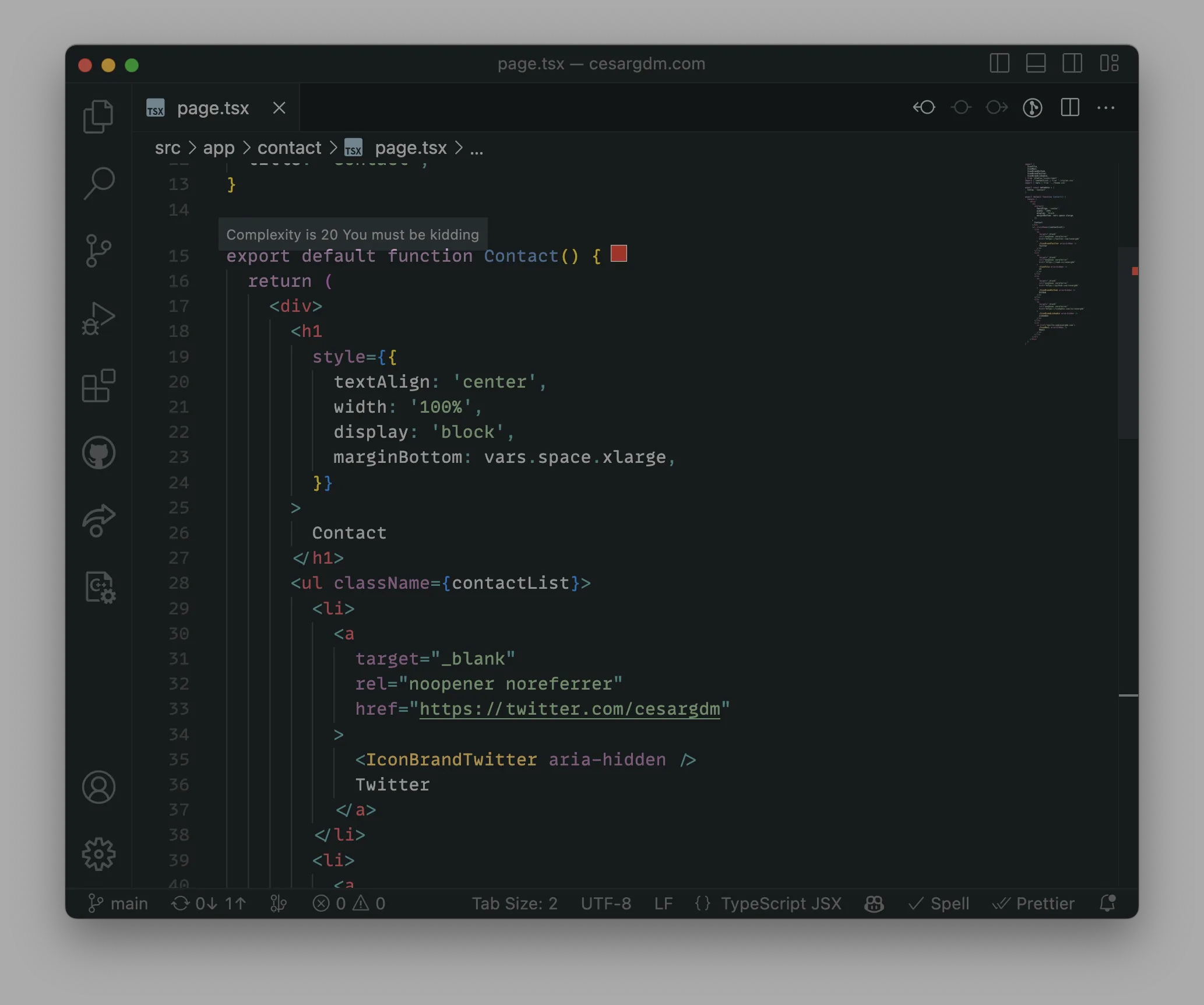
We can see that this component is too complex, and we should refactor it.
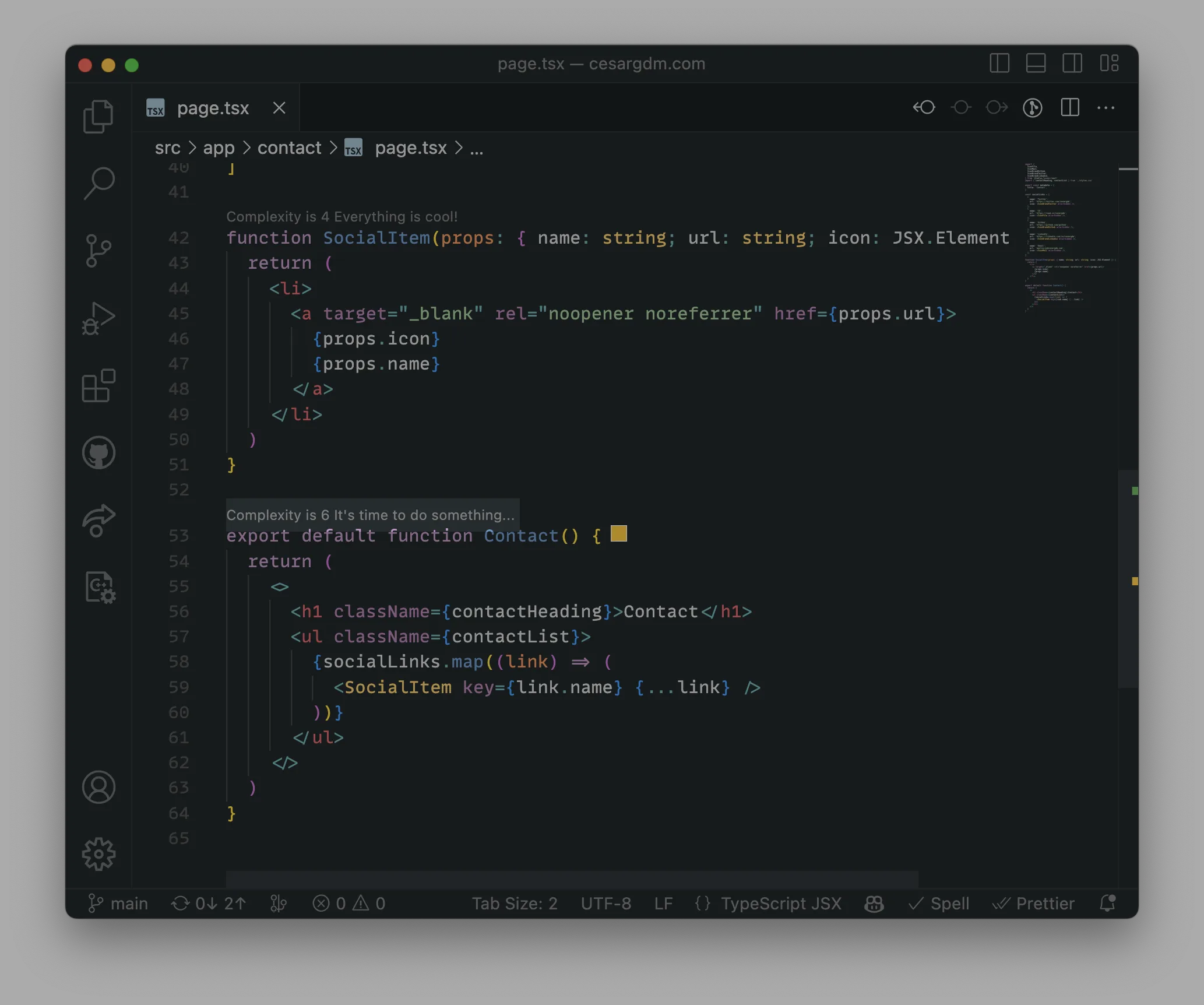
Ahh, much better. Smaller components, easier to read and understand.
Code Spell Checker
We can always improve our writing, but when it comes to code, a misspell is important to catch on. Imagine trying to refactor a recieveMessage that is spelled three different ways across the codebase, or searching for length in a file where someone typed lenght — the search returns nothing and the bug stays hidden.
It only checks identifiers, comments and strings, and it understands camelCase, so it reads recieveMessage as two words and flags just the wrong one.
Bonus
GitHub Copilot
Copilot is an amazing project built on top of OpenAI's models. It suggests whole lines and functions as you type, and it is at its best with the boring parts: a test case that looks like the previous three, a mapping function, the fifth variation of a form handler.
Treat it as an autocomplete with opinions, not as an author. It is confident when it is wrong, and reviewing a suggestion you did not think through is slower than writing the line yourself.
A nice alternative, if you would rather keep your code on your machine, is Tabnine — it offers a model that runs locally.